Cousins are over, someone suggests a quiz, and soon a parent is scoring on an envelope while nobody knows whose turn it is. The setup got in the way.
A quiz night is practice that does not feel like homework, and the best part is talking through each answer. Here is how to plan one for mixed ages, then how Party mode runs it.
How to plan a quiz night that works
Pick one grade and a few familiar topics. Choose topics every player has met at school, and set the grade at the level of the youngest confident player.
Keep it short. Ten questions is plenty for a first evening.
Let everyone answer before anyone talks, so each player gets time to think. Then reveal.
Make the reveal the teaching moment. Ask "How did you get that?" and invite anyone with a different answer to explain. Two methods for one question beat one quick answer.
Celebrate careful thinking, not speed. Praise a clear explanation or a good check as loudly as a correct answer.
Share a phone. A grandparent and a younger child can team up on one phone. Rooms hold up to 20 phones, and anyone can sit out a round.
What Party mode is
Party mode is our family quiz game. A Family Max parent hosts from a phone, questions appear on a TV or any large screen, and guests answer on their own phones with no account. Each correct answer earns one point, with no timer or speed bonus, so careful work is never penalised if you wait for every answer before tapping Reveal. On the TV and guests' phones it is called Chalk Talk.
For parents (host)
You need a Family Max account (an active free trial counts), a phone, and a TV or large screen with a browser.
Step 1: Create the room on your phone
On the Family Dashboard (the Family tab), tap Party mode at the top. Choose a Grade (P is Primary, S is Secondary, so S1 is Sec 1) and Topics, then tap Create room. Only topics with Party mode questions are listed. Next time, a Same as last time card offers Open lobby with your last choices, or Change.
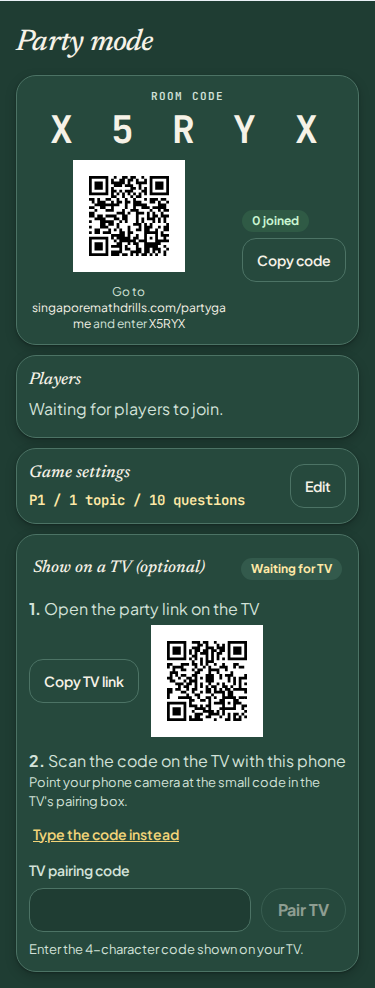
The lobby shows your five-character room code, a guest join QR code, the Players list and a Game settings card. Edit there changes the grade, topics or Questions per game (5, 10, 15 or 20; default 10). The lobby warns if fewer questions match your topics.
Step 2: Put the room on the TV
From our website on the TV. In the TV's browser, go to singaporemathdrills.com and select Party in the site header (or its menu on a narrow screen), or Explore Party mode on the homepage. Under Show a party on this screen, enter the Room code and select Show party.
From your phone. In the lobby, open Show on a TV (optional). Tap Copy TV link and send it to a laptop or tablet, or scan the QR code beside it with the tablet; either opens the TV page with your code filled in. Connect that device to the TV by HDMI or casting; this suits a TV with no browser too.
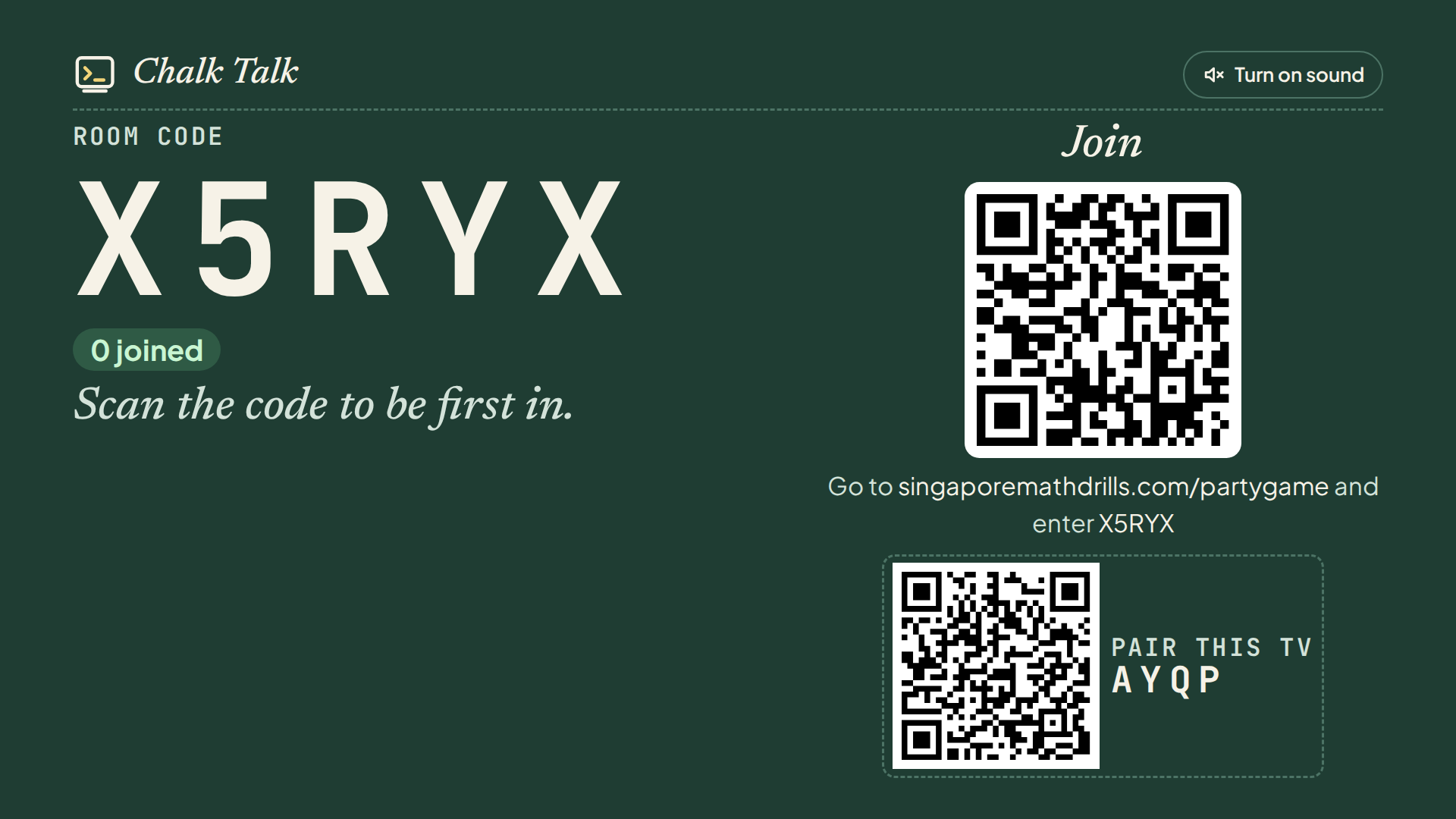
The TV lobby shows the room code, who has joined and a large join QR code under Join. Once the game starts, the code and a smaller QR code stay in the TV header.
Step 3: Pair the TV (optional)
Optional: your phone runs the whole game. Pairing adds TV host buttons for playing from the sofa with a remote or mouse. Pair in the lobby before starting.
- On the TV, find the Pair this TV box, with a small QR code and a four-character pairing code (not the room code).
- In Show on a TV (optional) on your phone, scan that small QR code, or tap Type the code instead, enter it into TV pairing code and tap Pair TV.
- Your phone shows Paired. The TV now has one main button at a time (Start party, Reveal, Next question, Play again), and More for Show hint, Skip, Close room and End party.
Pause, removing a player and ending early stay on your phone. Pairing codes expire after 10 minutes; reload the TV page for a new one. Unpair TV removes the TV's buttons.
Step 4: Run the game
Tap Start party once at least one guest has joined. Each question then appears on the TV and every guest's phone.
Before Reveal, only your phone shows the correct answer, under Answer (only you can see this). The Reveal button counts answers ("3/4 answered") and changes to Reveal — everyone answered when every guest is in. It never reveals by itself.
Show hint puts one hint step at a time on the TV and every phone; the final step needs a second tap, as it may give the answer away. Each correct answer earns one point, whether or not a hint was shown.
Reveal locks and scores the answers. The TV shows the correct answer and how many got it ("3 of 4 got it"), without names; your phone lists who got it right.
Next moves on; Skip passes on a question, which then scores nothing. Pause holds answers until you tap Resume. More holds End game early, Close room and Players (to remove a guest); ending, closing and removing each take a second tap.
After the last reveal, tap Next once more. The TV shows "That's a wrap!" with a top-three podium; each phone shows its player's place, the full ranking and the points everyone scored together. Scores are never added to anyone's account.
Step 5: Play again or close the room
Play again returns to the lobby with the same room code, where you can change settings. Guests' phones ask "The host started a new game. Play again?"; Play again keeps their nickname, or they tap Leave.
End party (tap twice) closes the room and deletes its data. An idle room expires after one hour, and no game history is stored.
For guests
Guests need only a phone with a browser: no account, app or sign-up.
Scan the QR code: in the lobby, the large one on the TV or the one on the host's phone; once the game starts, the small one in the TV header. It opens the join page, code filled in, and joins you straight away.
Type the code. On a phone and signed out, tap Join a party in our site header or its menu; a child signed in to their own account has the button in their dashboard's Today section. The Party mode page also has a Join a party box. Type the five-character room code into Party code; you join on the fifth character.
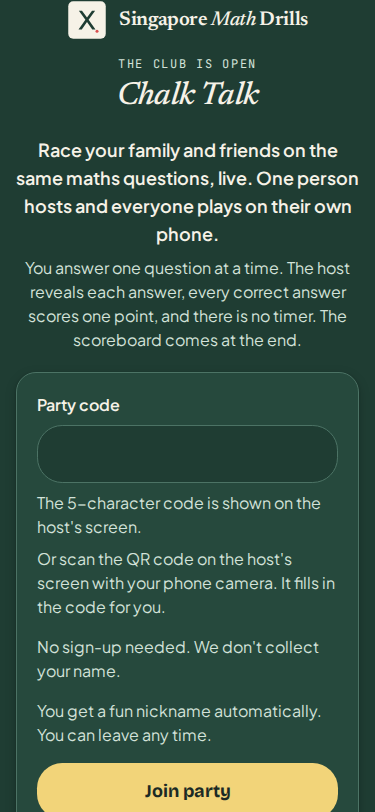
The page says: "No sign-up needed. We don't collect your name." You never type a name, and a child needs no parent details. You get a random adjective-and-animal nickname, unique in the room, with a chalk drawing of the animal.
While you play
Once in, your phone reads "You're in! The host starts soon." While you wait, Wave at the TV lights up your nickname on the TV.
Tap your choice or type your answer on the on-screen keypad; you can change it until the host taps Reveal. Scratchpad gives space for working; it clears each question and nothing on it is saved or sent.
If your phone sleeps, scan the join QR code again on the same phone, or type the code on the join page; you return as the same nickname.
Joining late? You can join until the game ends; you just miss points for earlier questions.
Good to know before the first game
- A parent has one live room at a time.
- Short sounds mark new players and questions, reveals and the game's end. Select Turn on sound once on the TV; each phone has its own mute button.
- Phones and the TV update every two seconds, so a screen may lag a moment.
- If a guest sees "That code isn't right. Check the screen again.", compare the code letter by letter with the TV.
- If many wrong codes are being tried, the join page may ask a guest to confirm they are a real person before joining.
- Last resort, for a browser with no other route: open
singaporemathdrills.com/partyscore on the screen or singaporemathdrills.com/partygame on a phone, then enter the room code.
Try it free
Preview the questions with a free interactive worksheet, no sign-up needed.
Try a free sample drill